System Overview
How WorldPay Select works
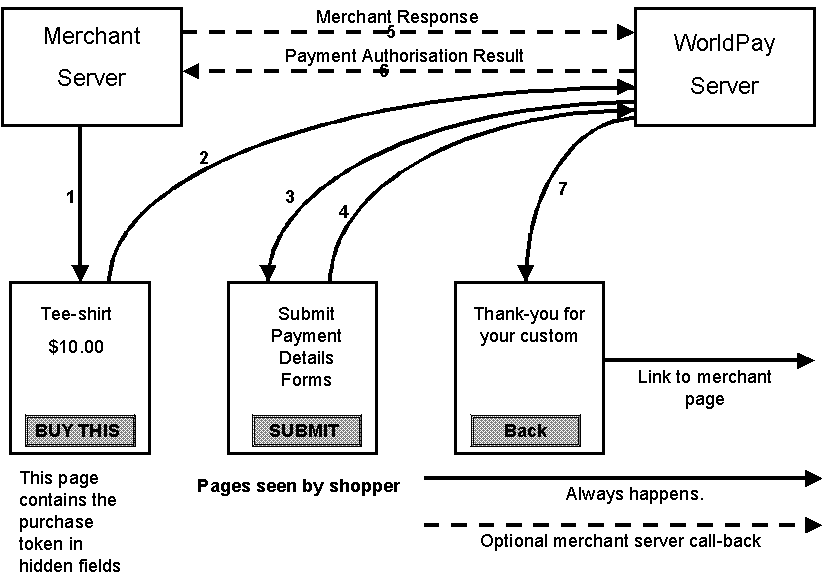
The following outlines the main stages in processing a payment through WorldPay.
- A shopper visits the merchant's web site and chooses the products/services that he would like to buy (the "shopping basket").
- The shopper submits the shopping basket to WorldPay for payment.
- WorldPay returns a series of forms from which the shopper chooses a payment method and submits his payment details to the WorldPay secure server. The possible payment options are:
- Credit/Debit card payment
-
Existing WorldAccount (micropayments)
If the shopper already has a WorldPay account, he can log on to use it for this purchase. - New WorldAccount (micropayments)
- WorldPay stores purchase and payment details on the WorldPay secure server database.
For both Credit/Debit card and WorldAccount payments:
- WorldPay sends a page to the shopper with the outcome of the payment transaction and, if it is the first time they have used WorldPay, their user name and password. If the shopper provides an email address, WorldPay sends an electronic receipt by email.
- The merchant has three options for being informed of the purchase transaction outcome. These can be configured via the WorldPay Administration Server:
- an email containing transaction details can be sent
- the WorldPay server can call a URL on the merchant site, passing the transaction details
- the merchant can log on to the Merchant Account Management System and view logs of all transactions
- The customer can log on to the WorldPay server to view details of their transactions and to obtain statements of their WorldAccount.
WorldPay also provides various administrative facilities to enable a merchant to manage their WorldPay accounts (see the Merchant Procedures Guide for full details).
WorldPay and different currencies
WorldPay deals seamlessly with different currencies.
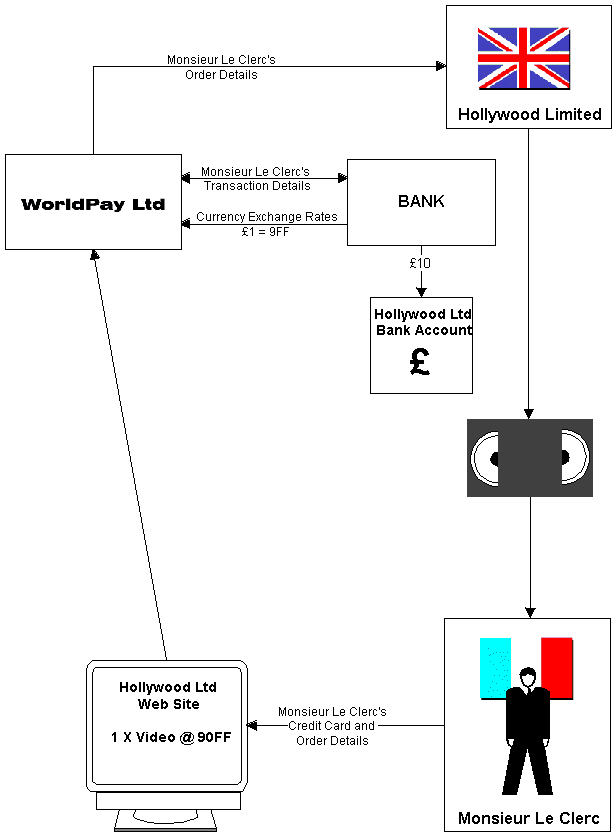
For example, Hollywood Ltd, a UK company, wants to use WorldPay for the sale of videos. Videos are sold to French shoppers for 90FF with settlement made in Sterling at 9FF=£1:
- Hollywood signs a merchant agreement with NatWest and an agreement with WorldPay. Hollywood establishes separate bank accounts if they require multiple settlement currencies.
- A shopper visits the Hollywood web site and pays 90FF for a video. WorldPay sends the transaction to NatWest and the order to Hollywood. Hollywood dispatches the product.
- NatWest collects on-line 90FF from the shopper's credit/debit card. Three days later NatWest transfers £10 into Hollywood's Sterling settlement account.
- Hollywood's shopper is charged 90FF by their credit card issuer.
- Every 24 hours NatWest transmits all the foreign exchange rates for the subsequent day to the WorldPay payment server, so that the shopper always sees prices at current exchange rates on the WorldPay server.
- WorldPay Select provides a URL which a merchant can call to retrieve the current exchange rates, enabling them to keep their own site up to date. For merchants using Select Pro the WorldPay server can automatically update the merchant's site with the latest exchange rates whenever they change.